Place examinee ability, rater severity, task difficulty, and rubric behavior onto one shared logit scale—with Python bundled inside for macOS and Windows.
受験者の実力・評価者の厳しさ・課題の難しさ・ルーブリック段階を1本の共通尺度で推定。macOSとWindows向けにPython同梱のデスクトップ試用版を配布しています。
Direct ZIP downloads for macOS (Apple Silicon, M1+) & Windows 11 (x64) · 3-step first launch ↓ · Release notes ↗ · Version 0.2.19-beta · MIT License · CRAN mfrmr for R
macOS(Apple Silicon / M1以降)・Windows 11(x64)公式ZIP直接ダウンロード · 初回起動の3ステップ ↓ · Release詳細 ↗ · Version 0.2.19-beta · MIT License · R版 mfrmr
In essay, speaking, or clinical performance assessments, examinees rarely face identical conditions. Averaging rubric numbers treats every rater, prompt, and score step as interchangeable.
作文・スピーキング・実技試験では、誰がどの課題を採点するかによって得点が動きます。単純な平均点は、評価者ごとの甘辛や課題の難しさ、段階幅の違いを区別できません。
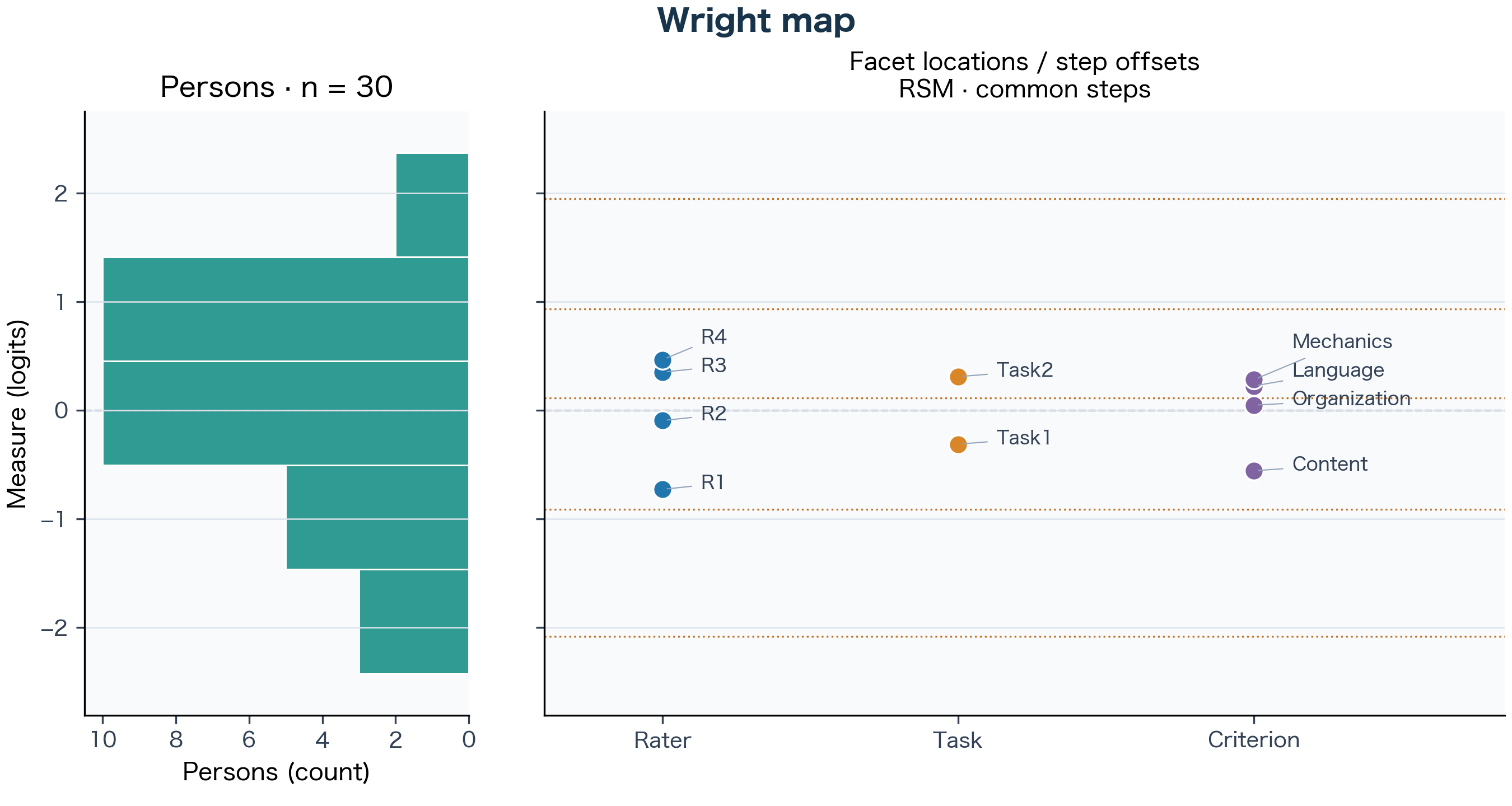
A student averaging 3.2 under your most severe rater on an abstract prompt may have demonstrated higher ability than a peer averaging 3.6 under a lenient rater on an easier prompt. MFRM places examinees, raters, tasks, and criteria onto one common logit scale centered at 0.00.
厳しい評価者と難度の高い課題に当たって平均3.2点だった受験者の方が、甘めの評価者と易しい課題で3.6点だった受験者より高い実力を示していることがあります。MFRMは各相を0.00基準の共通ロジット尺度上で同時に推定します。
Two raters can rank students in nearly the same order (r = 0.90) while one consistently awards scores a full point lower. MFRM separates overall rater severity from erratic scoring behavior (Infit MnSq).
2人の評価者の順位相関が r = 0.90 と高くても、片方が常に1点低く採点していれば合否や順位に影響します。MFRMは「一貫した厳しさ」と「採点のブレ(Infit MnSq)」を切り分けます。
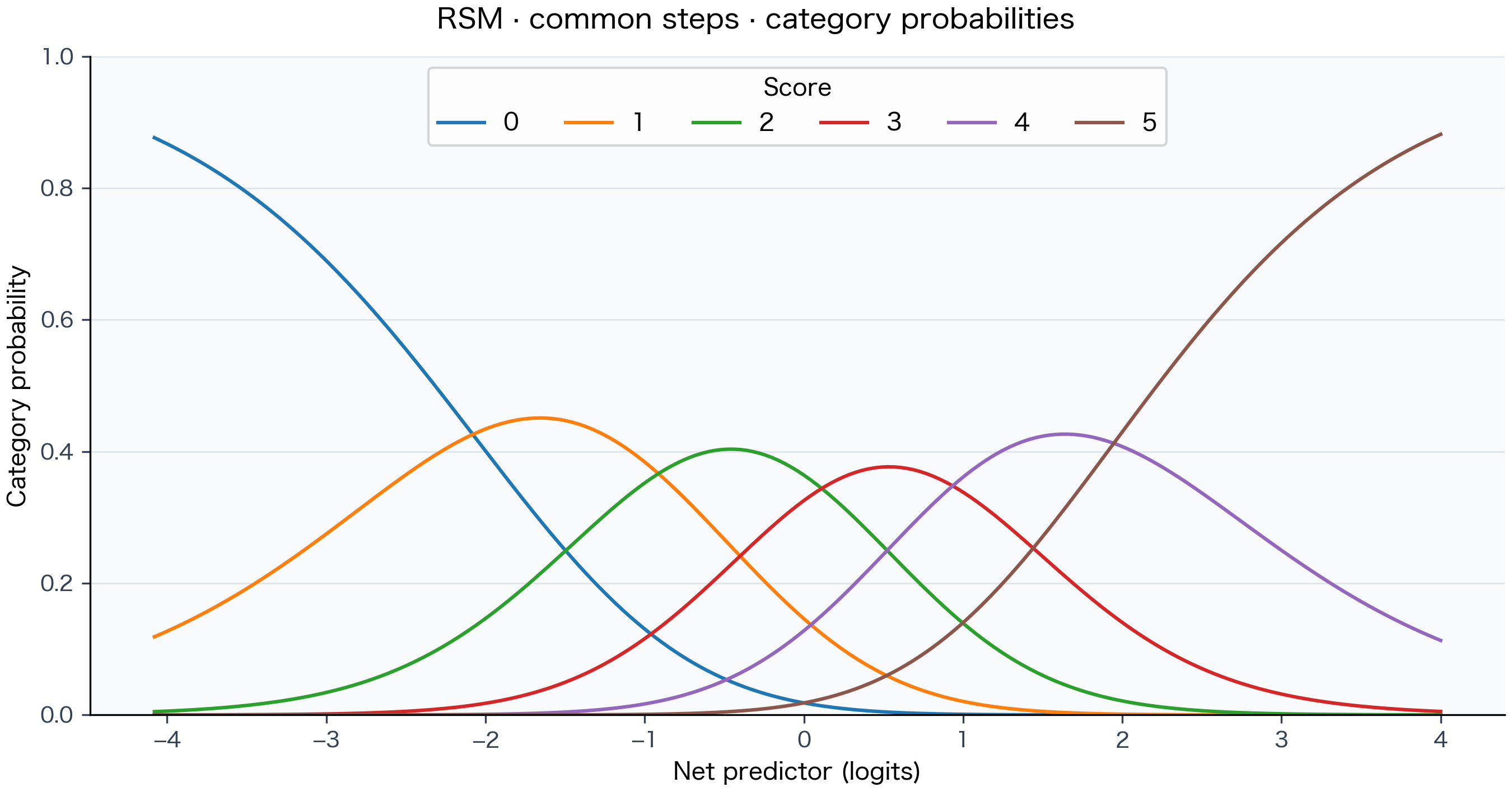
Category probability curves show whether every rubric level from 0 to 5 represents a distinct performance band, while univariate balanced Generalizability / Decision (G/D) studies show whether adding tasks or raters improves score reliability faster.
カテゴリー確率曲線で0〜5の各段階が順序通り機能しているかを確認でき、均衡設計の単変量G/D-Studyによって「評価者を増やすか、課題を増やすか」の信頼性比較も行えます。
| Case / Facet対象 | Condition採点条件・推定値 | What it means解釈 |
|---|---|---|
| Student A | Raw mean 3.2 · Rater 4, Task 2 素点平均 3.2 · Rater 4, Task 2 | Looks lower in spreadsheet averages despite facing the most severe rater and harder prompt. 最も厳しい評価者と難しい課題の組み合わせのため、素点平均だけでは不利に見える。 |
| Student B | Raw mean 3.6 · Rater 1, Task 1 素点平均 3.6 · Rater 1, Task 1 | Benefits from nearly 1.2 logits of rater leniency plus an easier prompt. 評価者だけで約1.2ロジット甘く、課題も易しいため素点平均が高く出る。 |
| Rater 1 vs. Rater 4 | −0.73 vs. +0.47 logits Infit MnSq: 1.01 / 1.05 |
Substantial gap in severity, yet both raters apply their standards consistently near 1.00. 厳しさには大きな差がある一方、両者とも Infit は1.00付近で一貫した基準を保っている。 |
| Content vs. Mechanics | −0.56 vs. +0.28 logits | High marks are awarded more readily on Content than on Mechanics or Language (+0.23). Content に比べて Mechanics や Language(+0.23)の方が高得点を取りにくい。 |
Each chart answers a specific measurement question—and carries explicit notes showing what the estimate supports and what should not be overclaimed in a thesis or manuscript.
それぞれの図が答える問い、確認すべきサイン、そして論文や報告書で過大解釈を避けるための統計的境界を整理しています。
Vertical overlap between examinee bars on the left and rater, task, criterion, and step locations on the right indicates that the rubric matches the cohort's ability range.
左側の受験者分布と、右側の評価者・課題・観点および段階閾値が縦方向に重なっていれば、テスト難度が受験者層に適合しています。
If examinees cluster far above or below the facet locations, check Observed Category Use for ceiling or floor bunching.
受験者分布が課題や閾値より大きく上または下へ外れている場合は、天井効果・床効果や極端得点をカテゴリー度数表で確認します。
Verify rating connectedness—shared examinees or tasks linking raters—before interpreting all facets on a single common ruler.
評価者や課題の間に共通の採点割り当て(連結性)があることを確認した上で同一尺度上の位置を比較してください。
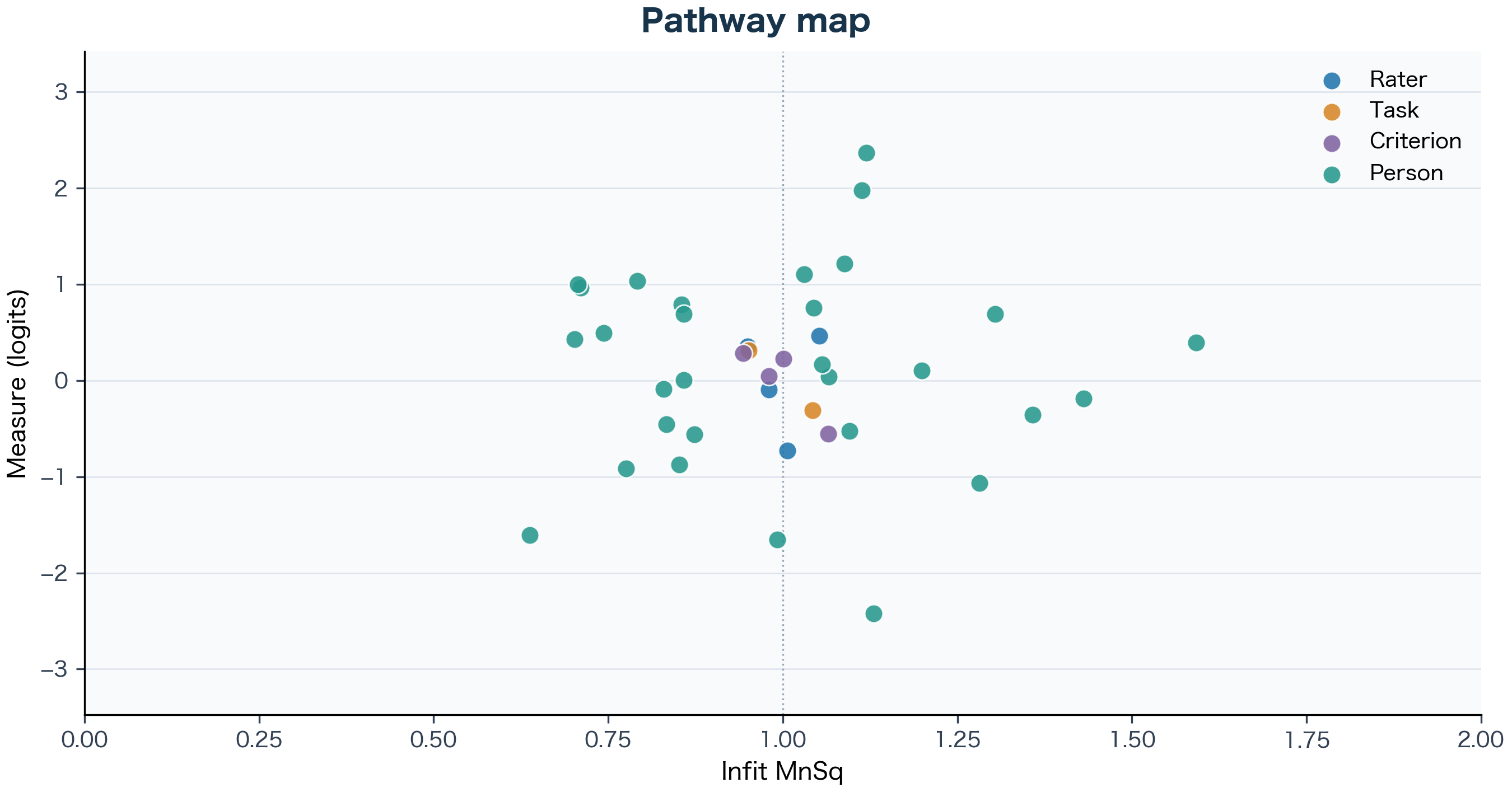
Vertical position shows rater severity or task difficulty; horizontal position shows consistency around Infit MnSq = 1.00. A severe rater near 1.00 grades toughly in a predictable way.
縦軸が厳しさ・難度、横軸が Infit MnSq = 1.00 付近の一貫性を表します。厳しくても1.00付近にあれば、基準が一貫していると読めます。
Points far right (> 1, underfit) flag noisy or unexpected ratings; points far left (< 1, overfit) suggest central tendency or halo scoring.
右側(> 1)は予想外のばらつき、左側(< 1)は中心化傾向やハロー効果による変動の小ささを示唆します。
Use fit statistics as diagnostic prompts to inspect observation counts and original records rather than automatic deletion rules.
適合度1つだけを根拠に評価者や受験者を機械的に除外せず、観測数や元の採点記録を確認する診断指標として扱ってください。
Each score from 0 to 5 rises to its own ordered peak from left to right as examinee ability increases relative to facet difficulty.
左から右へ相対的な能力が上がるにつれ、0から5の各カテゴリーが順番に明確な山を作っていれば段階が機能しています。
Flattened or buried middle curves indicate sparse observations or unclear descriptors; compare PCM if individual criteria use steps differently.
中間の山が埋もれる場合はまず各段階の観測度数を確認し、観点ごとに段階の使われ方が異なる場合は PCM も検討します。
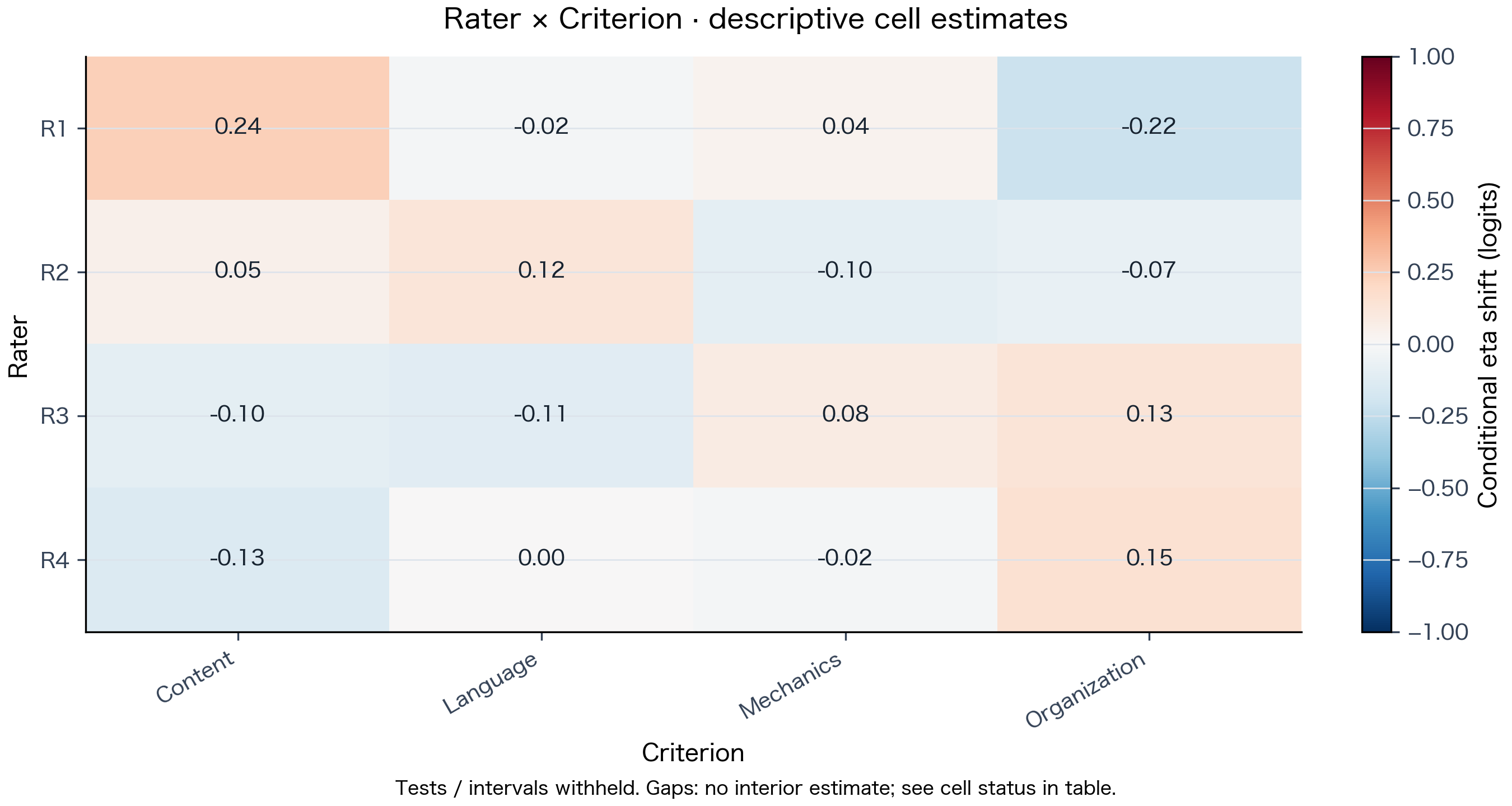
Cells near 0.00 behave as expected from main effects; larger positive or negative shifts point to specific rater-by-task or rater-by-criterion pairs worth reviewing in training.
0.00付近は主効果通り、ズレの大きいセルは評価者訓練やルーブリック見直しで点検すべき組み合わせを示します。
Conditional bias holds main calibration fixed and does not establish statistical significance or fairness. When model-based approximate intervals are needed, use numerically eligible fixed-SD MML Specified intervals or the refitted fixed-N(0,1) Joint interaction model (pointwise approximations; Holm adjusts the recorded family of requested tests, not the intervals).
条件付きバイアスは主較正を固定した探索的記述であり、有意差や公平性の証明には使えません。モデルに基づく点ごとの近似区間が必要な場合は、数値条件を満たす固定SD MMLの指定区間または固定N(0,1)共同交互作用を利用してください(Holm補正は指定した検定群に適用され、同時区間ではありません)。
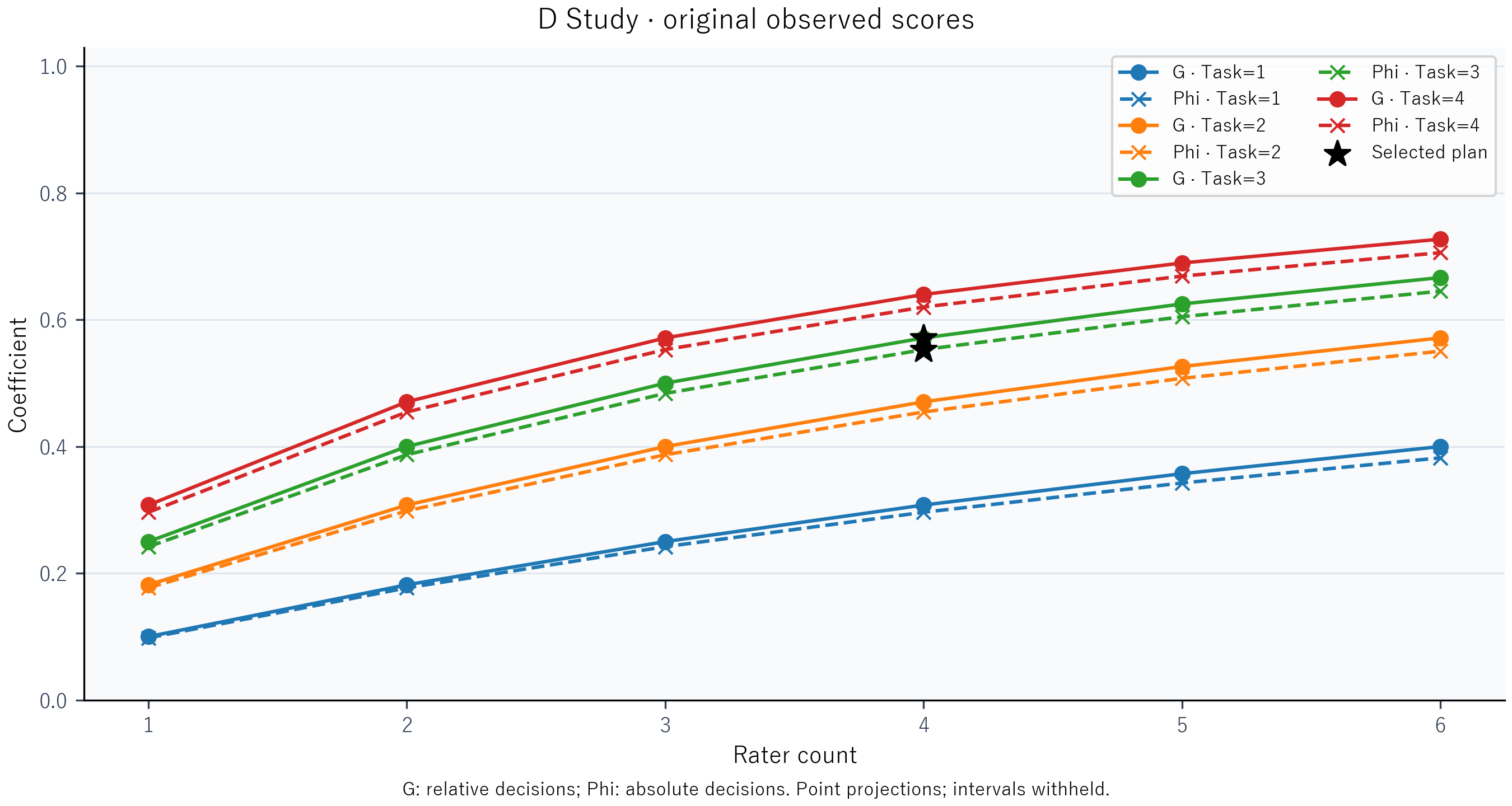
Solid lines show G for relative rank decisions; dashed lines show Phi for absolute cut-score decisions. Compare equal-budget combinations alongside the variance-component table.
実線(G)は相対的な順位判断、破線(Phi)は合否ラインなどの絶対判断に対応します。分散成分表と合わせて同コストの採点設計を比較できます。
Applies to univariate, completely crossed, balanced 1- or 2-random-facet observed-score designs (≥ 2 levels per facet, 1 observation per cell, unit weights). Confidence intervals for G / Phi and multivariate G-theory are not implemented.
単変量の観測得点に対する完全交差・均衡1〜2ランダム相設計(各相2水準以上・セルあたり1観測・単位重み)が対象です。G/Phiの信頼区間および多変量G理論は未実装です。
Use the standalone desktop app for local project files, the hosted Streamlit app for zero-install exploration and extended research modules, or the CRAN R package for scripted pipelines.
手元PCで完結するデスクトップ版、ブラウザからすぐ試せるStreamlit Web版、Rスクリプトで再現性を管理できるCRANパッケージから選べます。
Offline local workflow (Data → Settings → Results) with Python bundled inside for both macOS and Windows. Integrates RSM and PCM with JMLE or fixed-SD MML, Wright / Pathway / Category plots, conditional bias, fixed-SD specified intervals, fixed-N(0,1) joint interaction, balanced 1–2 facet G/D studies, restorable .mfrm project files, and 300-DPI PNG / SVG manuscript exports with .caption.txt notes.
機密データを外部へ送らずオフラインで完結する3画面アプリ(macOS・WindowsともPython同梱)。RSM/PCM × JMLE/固定SD MML、主要3プロット、条件付きバイアス、指定区間、固定N(0,1)共同交互作用、均衡1〜2相の単変量G/D-Study、再推定なしで復元できる .mfrm 保存、論文掲載用の300 DPI PNG/SVG+.caption.txt 出力、日英切替を統合しています。
Both 0.2.19-beta archives are hosted directly on GitHub Releases from identical runtime sources. On macOS (M1+, macOS 14.0+), expand MFRM-Desktop.app and approve once via Privacy & Security → Open Anyway; on Windows 11 x64, choose Extract All keeping MFRM-Desktop.exe alongside _internal.
両OSとも同一ソースからビルドした公式ZIP(0.2.19-beta)をGitHub Releasesから直接取得できます。macOS(M1以降・macOS 14.0+)では初回のみ「プライバシーとセキュリティ → このまま開く」で許可し、Windows 11 x64ではZIPを「すべて展開」して _internal と同じフォルダで起動してください。
MFRM Desktop is distributed 100% free of charge as open-source academic software without paid commercial Apple Developer Program notarization or Windows code-signing subscriptions. On first launch only, macOS Gatekeeper and Windows SmartScreen show a standard "could not verify free of malware / unrecognized publisher" prompt—not because malicious code was detected, but because no commercial signing certificate is attached.
MFRM Desktop は無償の学術オープンソースソフトウェアとして公開しており、有償の Apple Developer Program 公証や商用 Windows コード署名証明書を付与していません。そのため初回起動時のみ、悪質なコードが検出されたのではなく「商用署名がない」ことによるOS標準の確認ダイアログが表示されます。
Every line of statistical and UI code is publicly inspectable in the GitHub repository.
推定エンジンから画面表示まで、すべてのPythonコードを GitHub 上で全文公開しています。
Analysis, plotting, and saving transmit zero data or telemetry—turn off Wi-Fi before launching to verify everything runs offline (only Help → Web theory opens a browser).
分析・作図・保存において外部通信や情報送信は一切行いません。Wi-Fiを切った状態でもすべての分析機能が動作することで確認できます(Webヘルプを開く操作のみブラウザーを起動します)。
Both archives are hosted directly on GitHub Releases with native SHA-256 digests and GitHub Actions Sigstore provenance on Windows.
両OSとも GitHub公式Release から直接配布され、SHA-256ダイジェスト(Windows版はGitHub Actionsビルド証明付き)を公開しています。
MFRM-Desktop-macOS-arm64.zip to extract MFRM-Desktop.app, and place it in Applications if desired.MFRM-Desktop.app. When "MFRM-Desktop" Not Opened appears, click Done — do NOT click the blue "Move to Trash" button.MFRM-Desktop-macOS-arm64.zip を展開し、MFRM-Desktop.app を Applications などへ置きます。MFRM-Desktop-Windows-x64.zip in File Explorer and choose Extract All. Keep MFRM-Desktop.exe and the _internal folder together in the same directory.MFRM-Desktop.exe.MFRM-Desktop-Windows-x64.zip を右クリックして「すべて展開」を選び、MFRM-Desktop.exe と _internal フォルダを同じ場所に保ちます。MFRM-Desktop.exe をダブルクリックします。
GitHub automatically displays the verified sha256 digest next to each file on the Desktop Release page (alongside SHA256SUMS.txt). If you wish to check locally before launching:
GitHub Releaseページ のAssets欄に各ZIPの公式 sha256 と SHA256SUMS.txt が自動表示されています。手元で照合する場合は以下の1行コマンドを利用できます:
Runs directly in your browser with a guided sample tour, Excel / CSV / TSV / Parquet import, and First Read summaries—plus extended research modules including bounded GPCM, latent regression, anchor audit and linking, residual PCA, and simulation.
インストール不要でブラウザからすぐ試せるWeb環境。サンプルツアーやExcel貼り付け読込に加え、制約付きGPCM、潜在回帰、アンカー点検・リンク、残差PCA、シミュレーションなどの拡張研究機能を備えています。
Use synthetic or appropriately de-identified data on the hosted server, or run locally from Python source for confidential datasets. When hosted PNG export is unavailable, download the interactive HTML figures instead.
公開サーバーでは人工データまたは適切に匿名化したデータのみを使用し、機密データは手元のPython環境でローカル起動してください(公開環境でPNG出力が使えない場合は対話型HTML図を保存できます)。
Native R package for reproducible scripted MFRM pipelines—supporting RSM, PCM, and bounded GPCM under MML or JML, anchoring and linking, bias / DFF screening, uncertainty-aware Wright maps, and reporting manifests.
RスクリプトやQuarto文書で分析工程をコード管理したい研究者向けのネイティブRパッケージ。RSM・PCM・制約付きGPCM(MML/JML)、アンカー・リンク、バイアス/DFFスクリーニング、再現用マニフェスト出力に対応しています。
MFRM Python (Desktop / Web) and mfrmr are independent implementations. When comparing outputs across mfrmr, FACETS, ConQuest, or TAM, align the estimator, identification constraints, quadrature settings, and SE definitions rather than assuming automatic numerical identity.
Python版(Desktop/Web)と mfrmr は独立した実装です。mfrmr・FACETS・ConQuest・TAM等の間で結果を比較する際は、推定法・識別制約・求積点・SEの定義を揃えて確認してください(無条件の数値一致は前提としません)。
Before starting an analysis or writing up a manuscript, check which models and inferences are supported, which require input adjustments, and which remain restricted across this software.
分析を始める前や論文を執筆する前に、「そのまま使える機能」「データや設計を整えれば使えるケース」「本実装では提供・保証していない推論」を区別して確認できます。
How to proceed: Recode rubric categories to integers before import, and check rating connectedness (shared links across raters and tasks) before interpreting cross-group logit differences.
対応方法:得点を0以上の整数へ整えて読み込み、評価者・課題間に共通の採点リンク(連結性)があることを確認してから比較してください。
How to proceed: Treat blank SE or interval cells as unavailable (never zero). Register planned structural contrasts in Specified intervals, and read Analyses, Interpretation & Reporting Limits.
対応方法:空欄のSE・区間は「ゼロ」ではなく利用不可(保留)として扱い、構造相の比較には指定区間を使用し、詳細は 分析手法・報告上の境界 を参照してください。
How to proceed: Report Conditional bias strictly as descriptive screening; use Joint interaction when a refitted model for a specific facet pair is required.
対応方法:条件付きバイアスは評価者訓練などの探索的記述として報告し、モデル再推定による近似区間が必要な場合は共同交互作用を選択してください。
How to proceed: Use MFRM when rater assignments are incomplete (with connected links), or run G/D on a complete balanced sub-cohort and document the subsetting.
対応方法:欠測のある採点設計では(連結性を満たす)MFRMを使い、G/D-Studyは完全交差が成立する均衡データに対して適用してください。
How to proceed: Match the estimator, centering constraints, population SD, quadrature settings, and SE target definition before comparing software outputs.
対応方法:ソフト間で比較する際は、推定法・識別制約・母集団SD・求積設定・SEの定義を揃えた上で比較してください。
How to proceed: On macOS, verify SHA-256 and use Privacy & Security → Open Anyway if permitted (without disabling Gatekeeper); on Windows, Extract All keeping _internal beside MFRM-Desktop.exe; on Intel Mac or Linux, run from Python source; keep original .mfrm backups and analyze confidential data locally.
対応方法:macOSではSHA-256確認後に「このまま開く」を使用し、WindowsではZIPをすべて展開して実行、Intel MacやLinuxではPythonソースから起動、更新時は元の .mfrm を保全し、機密データはローカル端末で扱ってください。
Practical answers on local data confidentiality, facet limits across modules, and setup across macOS and Windows.
機密データのオフライン利用、扱える相の数、環境構築やOS間のファイル共有についての回答です。
Yes—MFRM Desktop runs 100% locally offline on your computer. Reading CSVs, fitting models, generating plots, and saving .mfrm projects or .html / .csv files happen entirely on your Mac or Windows PC without uploading ratings or IDs to any external server (only clicking Help → Web theory and help opens online documentation in your browser, still without transmitting your data). Because saved .mfrm projects and exported reports retain input ratings and examinee/rater identifiers so you can reopen work without refitting, store them according to your institution's data rules and de-identify records before sharing files externally or using the public Streamlit Web app.
はい、MFRM Desktop はすべて手元のPC内(完全オフライン)で処理されます。 CSVの読み込み、パラメータ推定、作図、.mfrm プロジェクトや .html・.csv の保存まで外部サーバーへのデータ送信は一切行われません(オンライン接続を使うのはメニューからWebヘルプを開く操作のみで、その際も評定データは送信されません)。なお、再推定なしで復元できるよう保存後の .mfrm やレポートには入力評定や受験者・評価者IDが含まれるため、所属機関の管理規定に沿って保管し、外部共有時や公開Streamlit Web版を試す際は匿名化データをご利用ください。
Core MFRM calibration (RSM / PCM, plus GPCM on Web) has no fixed upper limit on the number of facets—you can include Person plus one or more non-person facets (e.g., Rater, Task, Criterion, Occasion, and more) as long as all levels are connected through shared ratings (the Wright map prints direct level labels for up to 4 non-person facets and shows hover values beyond that). Module-specific bounds apply to supplementary analyses: Conditional bias screens 2-facet pairs (Facet A × Facet B); fixed-SD MML Specified intervals and Joint interaction support up to 64 free structural coordinates within synchronous memory limits (with Joint interaction refitting one 2-facet pair); and univariate G/D-Studies support 1 or 2 random facets (p × r or p × t × r complete balanced designs).
MFRMの主較正(RSM/PCM、Web版のGPCM)には相の数の固定上限はありません。 共通の採点網で連結(connected)していれば、Person に加えて Rater・Task・Criterion・Occasion など4相・5相以上でも同時推定できます(Wrightマップの図中ラベル直接印字は非Person 4相までで、5相以上はドット表示+マウスホバー確認に切り替わります)。周辺機能には個別の条件があり、条件付きバイアスは任意の2相ペア(Facet A × Facet B)ごとの診断、固定SD MMLの指定区間・共同交互作用は自由構造パラメータ合計 64 次元以内(共同交互作用は非Person 2相ペア1組)、単変量のG/D-Studyはランダム相 1〜2個(p × r または p × t × r の完全交差・均衡設計)が対象です。
No Python, R, or command-line setup is needed for MFRM Desktop or MFRM Web. The macOS (Apple Silicon) and Windows 11 (x64) preview archives bundle Python inside, and saved .mfrm project files reopen across both operating systems via Data → Open project without re-running estimation (keep untouched backups of original .mfrm files when updating preview builds, as older releases cannot open newer extended projects). When you want scripted reproducibility in R, export standard .csv tables or run the companion CRAN package mfrmr.
MFRM Desktop と Web版は、PythonやRの事前インストール不要ですぐ使えます。 macOS(Apple Silicon)版・Windows 11(x64)版ともにPython実行環境を同梱しており、保存した .mfrm ファイルはMac・Windows間でそのまま開いて再推定なしで図表を確認できます(旧版アプリは新しい拡張 .mfrm を開けないため、更新時は元ファイルの控えを残してください)。Rコードで分析パイプラインを管理したい場合は、.csv 出力やCRAN公開の mfrmr と併用できます。
Because MFRM Desktop is distributed free of charge as open-source academic software without paid commercial Apple Developer Program notarization or commercial Windows code-signing subscriptions—not because malicious code was detected. Every line of Python code is public on GitHub, all analysis/plotting/saving executes offline with zero data upload or telemetry (verifiable with Wi-Fi turned off), and you can verify the exact SHA-256 hash before opening. On macOS Sequoia 15+, click Done (do not click the blue Move to Trash button), then open System Settings → Privacy & Security → Open Anyway; on Windows 11, click More info → Run anyway after extracting the ZIP. See the step-by-step first-launch & checksum guide above.
悪質なコードが検出されたのではなく、無償の学術オープンソースソフトウェアとして有償の Apple Developer Program 公証や商用コード署名証明書を付与していないためです。 全ソースコードをGitHubで公開しており、分析・作図・保存の外部通信はゼロ(Wi-Fiを切った完全オフライン状態で全分析機能が動作することで確認可能)、公開 SHA256SUMS.txt で改ざんがないことも検証できます。macOS Sequoia 15以降では青い「ゴミ箱に入れる」を押さずに「完了」をクリックし、「システム設定 → プライバシーとセキュリティ → このまま開く」から許可してください(初回のみ)。Windows 11ではZIPを「すべて展開」後に「詳細情報 → 実行」を選択します。具体的なコマンドと手順は上の初回起動・安全性確認ガイドをご覧ください。
Guides are built directly from the repository documentation so workflow instructions and statistical scope limits stay aligned across versions.
各ガイドはリポジトリの公式ドキュメントと同一ソースから生成されており、操作手順と統計上の利用境界をそのまま確認できます。
Windows and macOS setup, built-in writing walkthrough with table values, long-format CSV preparation, plot reading guide, and .mfrm / manuscript exports.
Windows・macOSの導入手順、サンプルデータの推定値確認、縦長CSVの準備、5つの図の解釈例、論文用図表・.mfrm保存のガイド。
Japanese desktop setup and workflow guide covering the built-in writing walkthrough, long-format CSV preparation, MFRM / G/D-Study settings, and .mfrm compatibility.
macOS・Windows試用版の展開・起動、内蔵サンプルの操作手順、縦長CSVの準備、MFRM/G/D-Studyの設定、保存・再読込・互換性の注意点。
Method-by-method scope covering JMLE conditional screening bounds, fixed-SD MML specified intervals, conditional bias vs. joint interaction, and univariate G/D-Study requirements.
JMLEの条件付きスクリーニング基準、固定SD MMLの指定区間、条件付きバイアスと共同交互作用の違い、単変量G/D-Studyの設計要件。
Checklists for documenting facets, scale identification, fit diagnostics, figure captions, and withheld-inference boundaries in theses and journal articles.
学位論文や学術誌向けに、相の構成・識別制約・適合度・図注・保留推論の境界を記載するためのチェックリスト。
Cite Ryuya Komuro in APA 7th edition format for the edition you used—in-text: (Komuro, 2026) or Komuro (2026)—alongside the underlying psychometric methods.
論文・発表での引用は、利用した環境に合わせて Ryuya Komuro を著者としたAPA第7版スタイル(本文内引用:(Komuro, 2026) または Komuro (2026))をご使用ください。統計手法自体の原典も併せて引用してください。
Also record the release tag (desktop-20261031) and archive filename in your Methods section (built-in CITATION.cff sidecars record the shared repository title MFRM Streamlit).
本文または方法欄に使用したReleaseタグ(desktop-20261031)と配布ZIP名も記録してください(同梱 CITATION.cff は共通リポジトリ名 MFRM Streamlit を記録します)。
Record the exact version and source commit shown in About MFRM (where BibTeX and CITATION.cff files can also be downloaded).
アプリ内の About MFRM に表示されるバージョンとソースコミットを記録してください(BibTeX・CITATION.cff もダウンロード可能です)。
Substitute the installed package version from packageVersion("mfrmr") or run citation("mfrmr") in R.
バージョン番号は実際に使用した版(R上で packageVersion("mfrmr") または citation("mfrmr") で確認)に置き換えてください。
Free for research, teaching, and commercial use: Released under the MIT License (Responsible Use Notice). Academic research, thesis work, classroom instruction, institutional testing, consulting, and commercial applications are all permitted free of charge (retain copyright and license notices when redistributing; bundled third-party components retain their respective licenses).
Provided "AS IS" — responsibility rests with the user: Because this software is provided free of charge, it comes without warranty of any kind. Users bear sole responsibility for data protection and institutional compliance, verifying model assumptions and design eligibility, respecting withheld-inference notices, and any substantive, educational, clinical, or operational decisions based on the outputs. Neither the author (Ryuya Komuro) nor copyright holders assume any liability for claims, losses, or damages arising from its use.
研究用・教育用・商用すべて無償で利用可能:MITライセンス(利用上の注意)に基づき、学術研究・学位論文・授業・学内評価・コンサルティング・商用利用を含めすべて無料で許可しています(再配布時は著作権・ライセンス表示を保持してください。第三者ライブラリには各ライセンスが適用されます)。
無保証・利用者責任の明示:本ソフトウェアは無償で提供されるため、いかなる保証も伴わず現状のまま(AS IS)提供され、利用に関する責任はすべて利用者にあります。データの保護や所属機関の規定遵守、モデル仮定・設計条件の確認、保留判定(空欄の SE 等)の適切な扱い、および出力結果に基づく解釈・評価・意思決定について、作成者(Ryuya Komuro)は一切の損害・責任を負いません。
If you encounter a bug, crash, or unexpected behavior, please report it by email to the author, Ryuya Komuro, at ryuya.komuro.c4@tohoku.ac.jp.
Please include: (1) your OS and version (e.g., macOS 15 arm64 or Windows 11 x64), (2) the edition, app version (0.2.19-beta), and archive filename (or mfrmr version), (3) steps to reproduce, and (4) the exact error message or screenshot. Do not attach confidential or identifiable examinee/rater data—reproduce the issue with the built-in sample or anonymized synthetic data whenever possible.
動作不良・エラー・表示崩れ等を見つけた際は、作成者 Ryuya Komuro(ryuya.komuro.c4@tohoku.ac.jp)までメールでご報告ください。
ご連絡時に添えていただきたい情報:① OSとバージョン(例:macOS 15 arm64 / Windows 11 x64)、② 利用環境・アプリ版(0.2.19-beta)・配布ZIP名(または mfrmr の版)、③ 再現手順、④ 正確なエラーメッセージや画面キャプチャ。メール本文や添付ファイルに受験者・評価者の個人情報や未匿名化の実データを含めないでください(可能な限り内蔵サンプルやダミーデータでの再現をお願いします)。