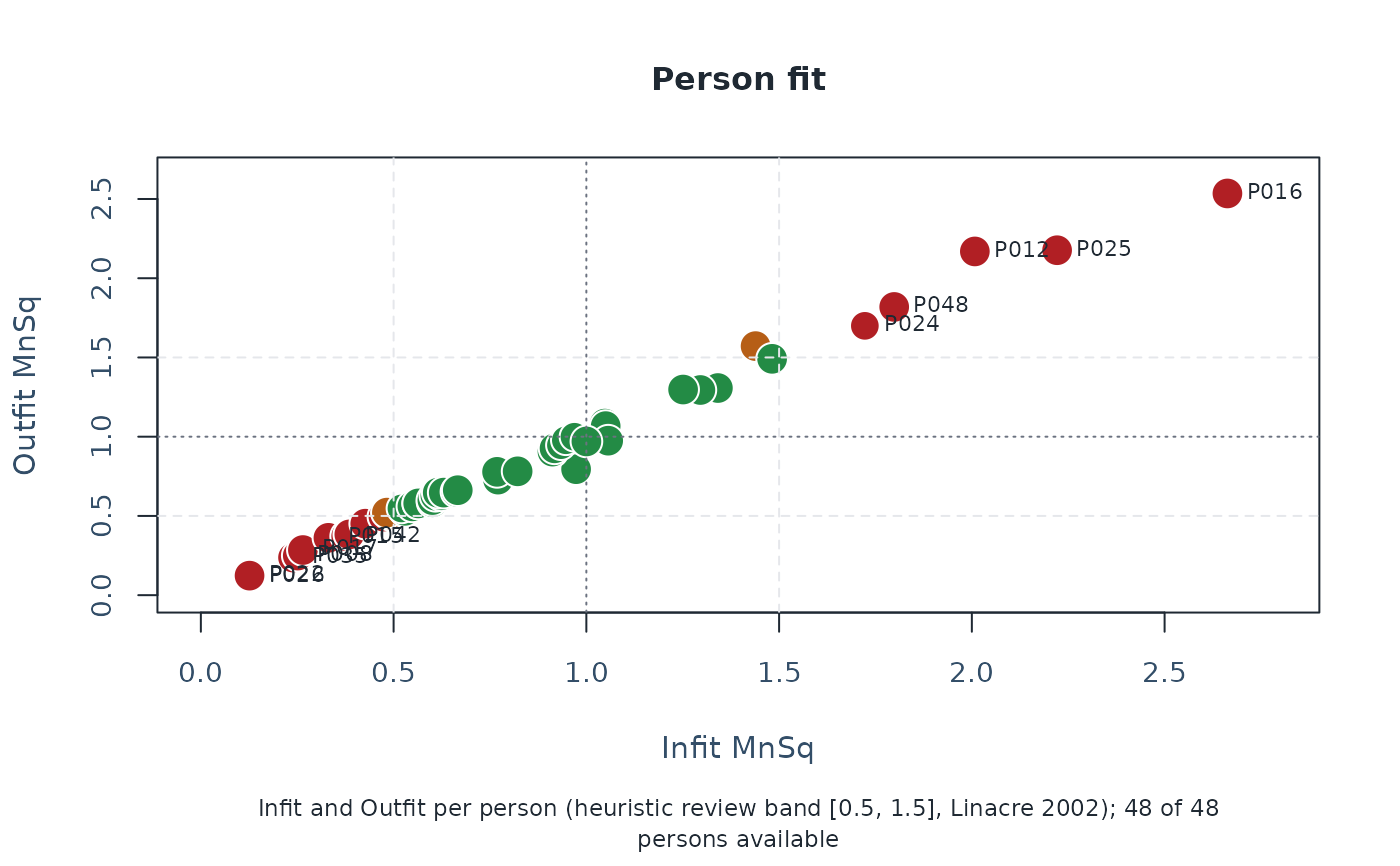
Per-person diagnostic bubble plot inspired by FACETS Table 6 / KIDMAP
summaries. Each bubble represents one person at the intersection of
Infit (x) and Outfit (y), sized by total observations and coloured by
the standard 0.5/1.5 fit envelope: green when both Infit and Outfit
fall in [lower, upper], amber when one statistic is outside, red
when both are outside. Set fit_index = "loglik" for a ranked view of
the report-ready lz_star / lz index instead.
Arguments
- fit
An
mfrm_fitfromfit_mfrm().- diagnostics
Optional
diagnose_mfrm()output. When omitted,diagnose_mfrm(fit, residual_pca = "none")is run internally.- lower
Lower fit threshold (default
0.5, Linacre 2002).- upper
Upper fit threshold (default
1.5).- top_n_label
Maximum number of persons whose label is drawn. The default mean-square view uses largest
|Infit - 1| + |Outfit - 1|;fit_index = "loglik"uses largest absolute report index. Default12.- preset
Visual preset, including
"monochrome".- draw
If
TRUE, draw with base graphics.- fit_index
Plot focus.
"meansquare"keeps the Infit/Outfit bubble plot."loglik"draws the report index selected bycompute_person_fit_indices()(lz_starwhen available, otherwiselzwith a caveat).
Value
An mfrm_plot_data object whose reusable plot data include
data with one row per person, plot_long for custom R graphics,
person_fit_indices from compute_person_fit_indices(), and compact
flag/status summaries.
Interpreting output
The default 0.5-1.5 envelope follows Linacre (2002) Rasch
Measurement Transactions. Persons in the green centre are
within the screening band; amber and red corners are candidates for
review (overfit / underfit) using
unexpected_response_table() for follow-up.
Session plot defaults
Set options(mfrmr.plot_preset = "publication") to choose a session default
for plotting functions that expose the common preset argument. The
supported values are "standard", "publication", "compact" and
"monochrome". Precedence is an explicit call argument, then the session
option, then "standard". For example, preset = "standard" overrides
a session set to "monochrome". Explicit preset = NULL retains the
earlier package-default behavior; it does not read the session option.
Invalid session values cause an error only when that option is needed.
The category-curve, data-quality, fit-review, connectivity and network
routes of plot() for report bundles use the same option through ....
Plots without a common preset argument, including extended-model plots
with their own palette controls, keep their own settings. This option
selects a preset, not a universal theme or a guarantee that all renderers
implement every appearance control identically.
New plot payloads retain the resolved preset for supported saved-data
rendering. Converting an existing payload with as_ggplot() uses its saved
appearance, even after the session option changes. A call that creates a
new plot from a fit or statistical result uses the current default.
For a reproducible script, supply preset explicitly or set the option in
that script. Saving only the fitted model does not save a session option.
No global ggplot theme is changed.
Restore previous settings with old <- options(mfrmr.plot_preset = "monochrome") followed by options(old). Use
options(mfrmr.plot_preset = NULL) to remove the option. The preset changes
appearance, not estimates, confidence levels or diagnostic thresholds.
Examples
# \donttest{
# Load the package and example ratings
library(mfrmr)
toy <- load_mfrmr_data("example_operational")
# Fit the model
fit <- fit_mfrm(
data = toy,
person = "Person",
facets = c("Rater", "Criterion"),
score = "Score",
method = "MML",
model = "RSM"
)
# Compute diagnostics once for the following checks
diagnostics <- diagnose_mfrm(fit)
# Compare each person's Infit and Outfit with the reference value of 1
plot_person_fit(fit, diagnostics = diagnostics)
 # Values above 1 indicate more response variation than expected, below 1 less
# The reference bands flag patterns for review, not automatic exclusion
# }
# Values above 1 indicate more response variation than expected, below 1 less
# The reference bands flag patterns for review, not automatic exclusion
# }